From the first coffee to the final Z report.
Tablyvio runs your counter, tables and kitchen from one screen. Fast ordering, a live kitchen display, tax receipts in English and your local language, and stock that counts itself. Use it online in any browser, or install it on your laptop and keep selling when the internet drops.
- No card needed
- Receipts in 68 languages
- Works offline
- Set up in a day
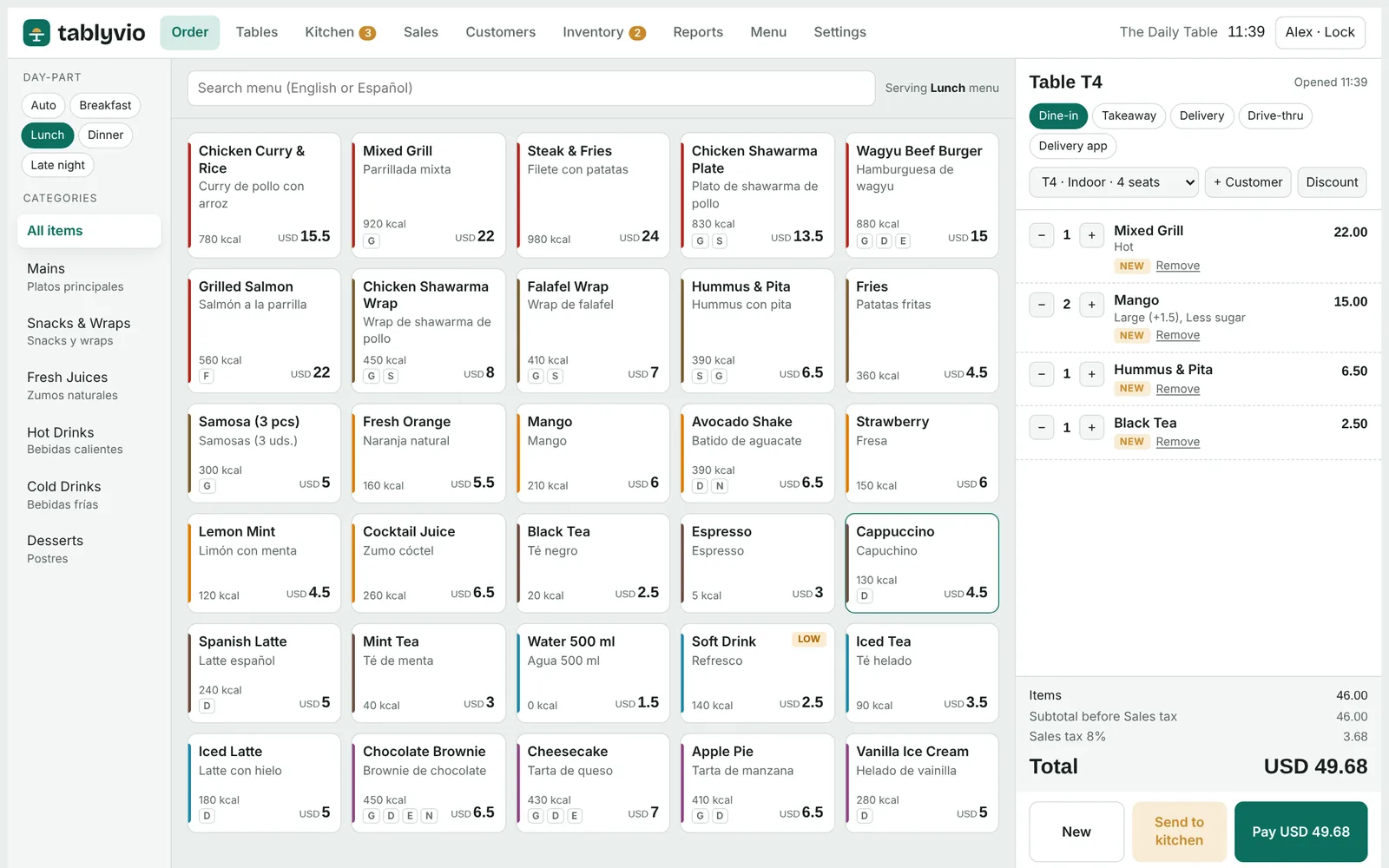
Everything a busy restaurant needs, nothing it has to fight.
Breakfast, lunch, dinner, snacks, juices and coffee all run through the same till, with the right menu showing at the right time of day.
Fast ordering
Dine-in, takeaway, delivery and drive-thru from one screen. Juice and coffee options like size, sugar, ice and milk pop up as you tap.
Kitchen display
Tickets go straight to the hot kitchen, grill, juice bar or coffee station, with timers that turn amber and red when food is waiting.
Tax set up for your country
Pick your country and Tablyvio sets the currency, tax rate and receipt format, with tax included in prices or added at the till. Your tax number prints on every receipt, refunds get credit notes, and you can enter your own rules if you need to.
Stock that counts itself
Each sale deducts ingredients from its recipe, including an extra shot or oat milk. Low-stock alerts and suggested orders follow.
Regulars who come back
Customer profiles by mobile number, loyalty points and tiers, allergy notes and birthday reminders.
Close the day in a minute
Sales by hour, item, category, channel and payment, plus X and Z reports with tax totals ready for your accountant.
Local currency, local tax, local language.
Tablyvio adapts to the country you trade in, so your prices, receipts and reports look right to your customers and your accountant.
Open it in a browser, or install it on your laptop.
The same Tablyvio works both ways, so you can start in minutes and keep trading through a bad connection.
Use it in any browser
Open Tablyvio in Chrome, Edge or Safari on a tablet, laptop or desktop. Nothing to install and always the latest version.
- Sign in with your staff PIN
- Updates arrive automatically
- Works on Windows, Mac, iPad and Android tablets
Install it on your computer
Install Tablyvio as an app on Windows or Mac. It opens from your desktop and keeps taking orders and printing receipts with no internet at all.
- One click to install from Chrome or Edge
- Sales are saved on the device
- Daily backup in one tap
Cloud sync, so every till, kitchen screen and branch shares the same orders and reports in real time, is coming with Tablyvio Cloud. Until then, each device keeps its own records.
See every screen before you sign up.
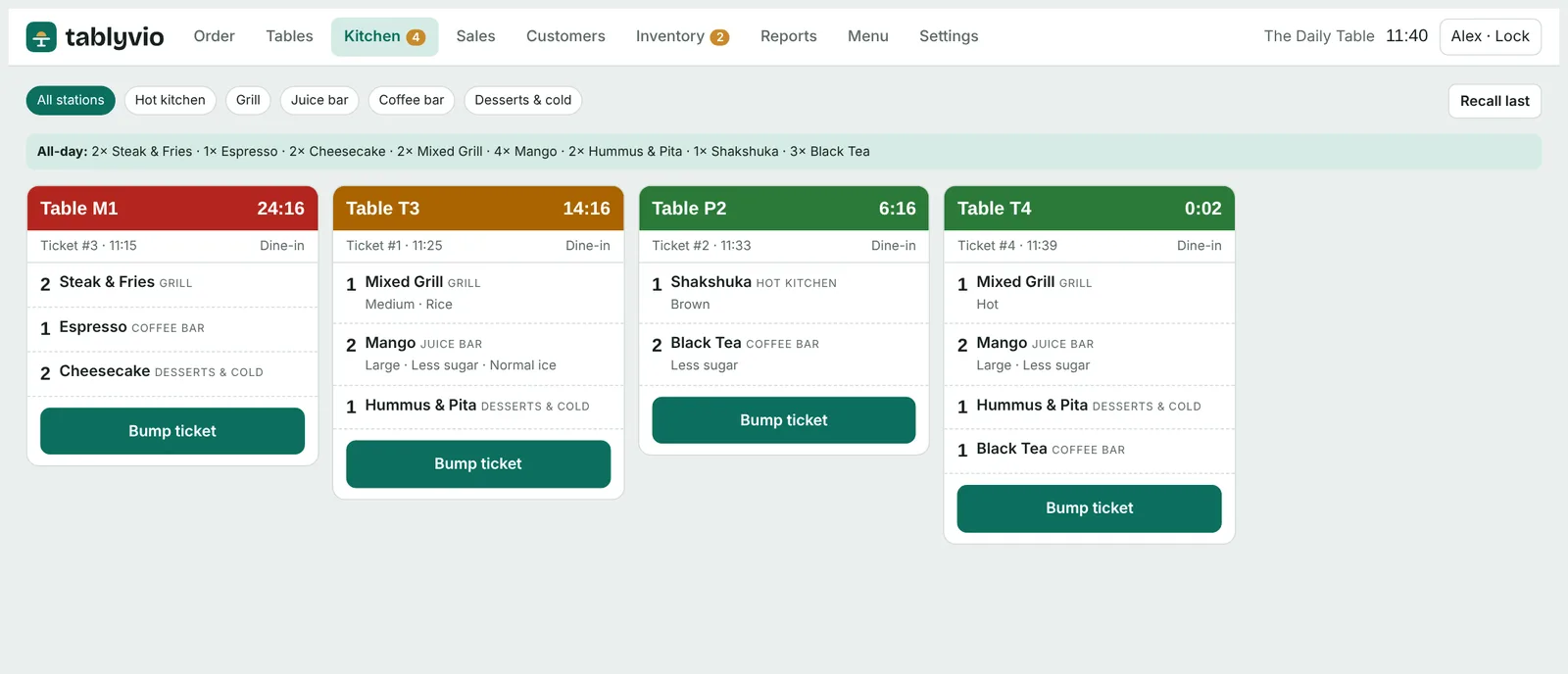
Every station sees its own tickets
Filter by hot kitchen, grill, juice bar, coffee bar or desserts. The all-day count tells the line how many of each dish are still to go, and allergy warnings stand out in red.
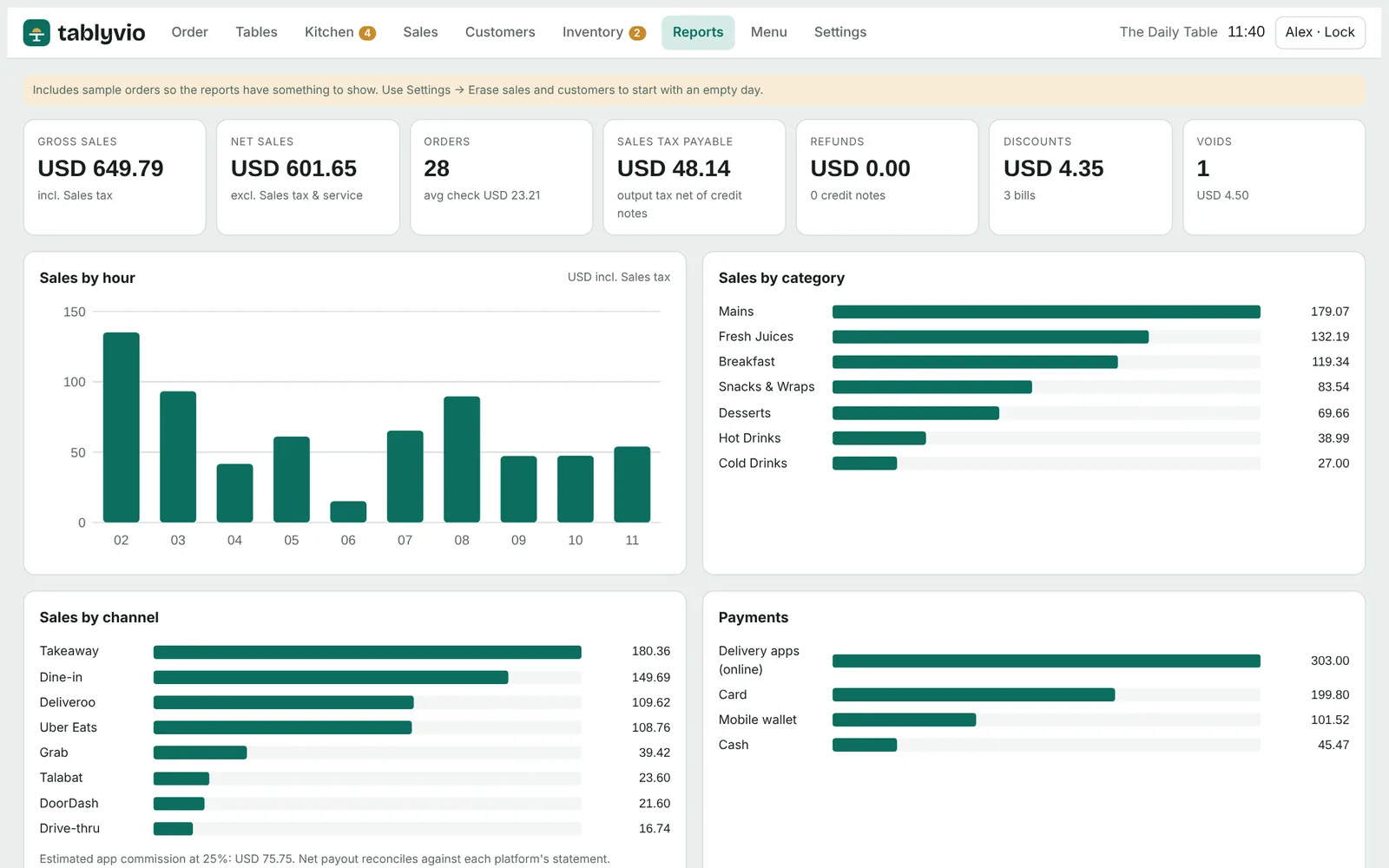
Know your day at a glance
Gross and net sales, average check, tax payable, discounts, voids and refunds, with sales by hour, category, channel and payment method.
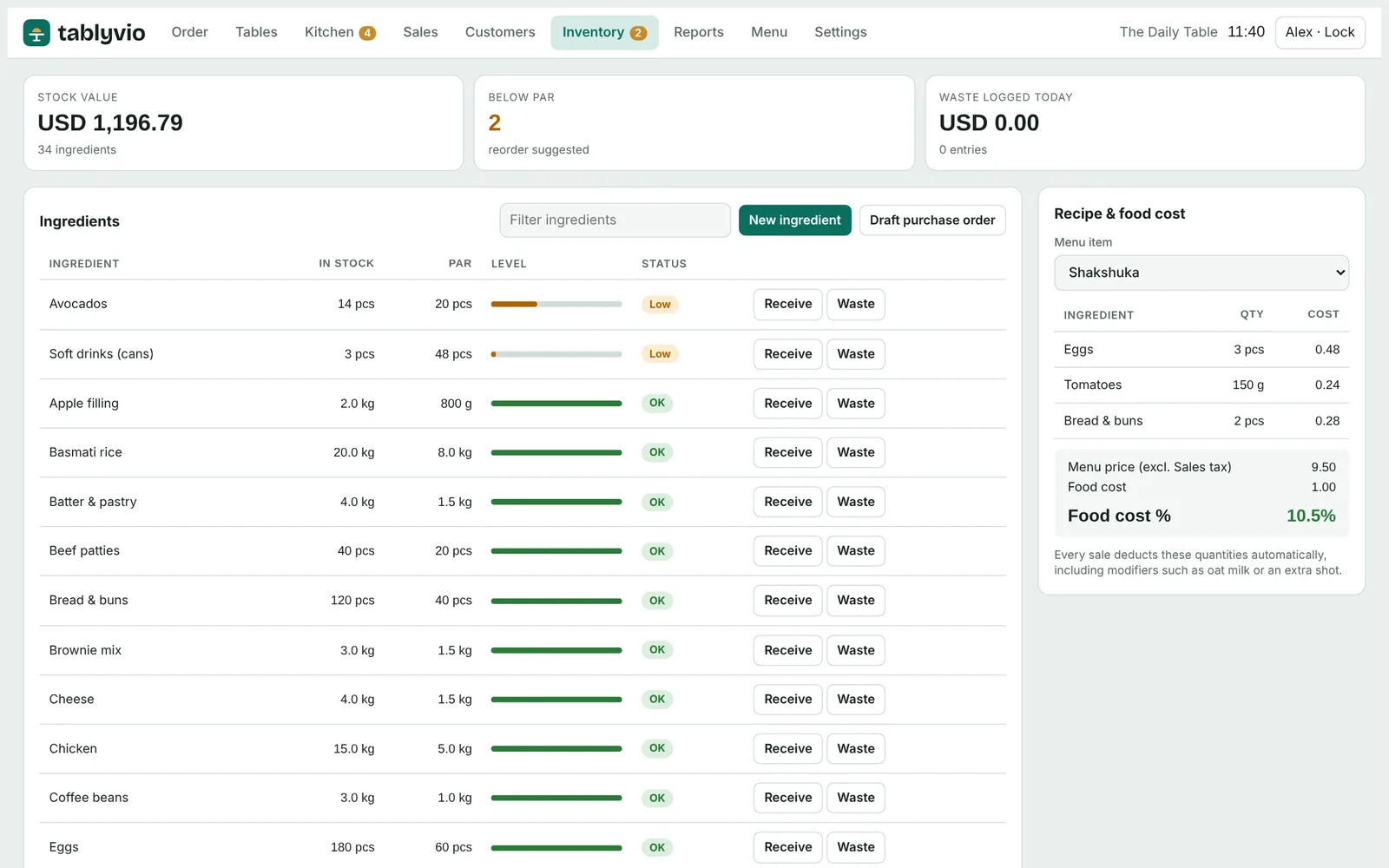
Food cost on every dish
Recipes link each dish to its ingredients, so you see food cost percentage, low stock and a suggested purchase order in one place.
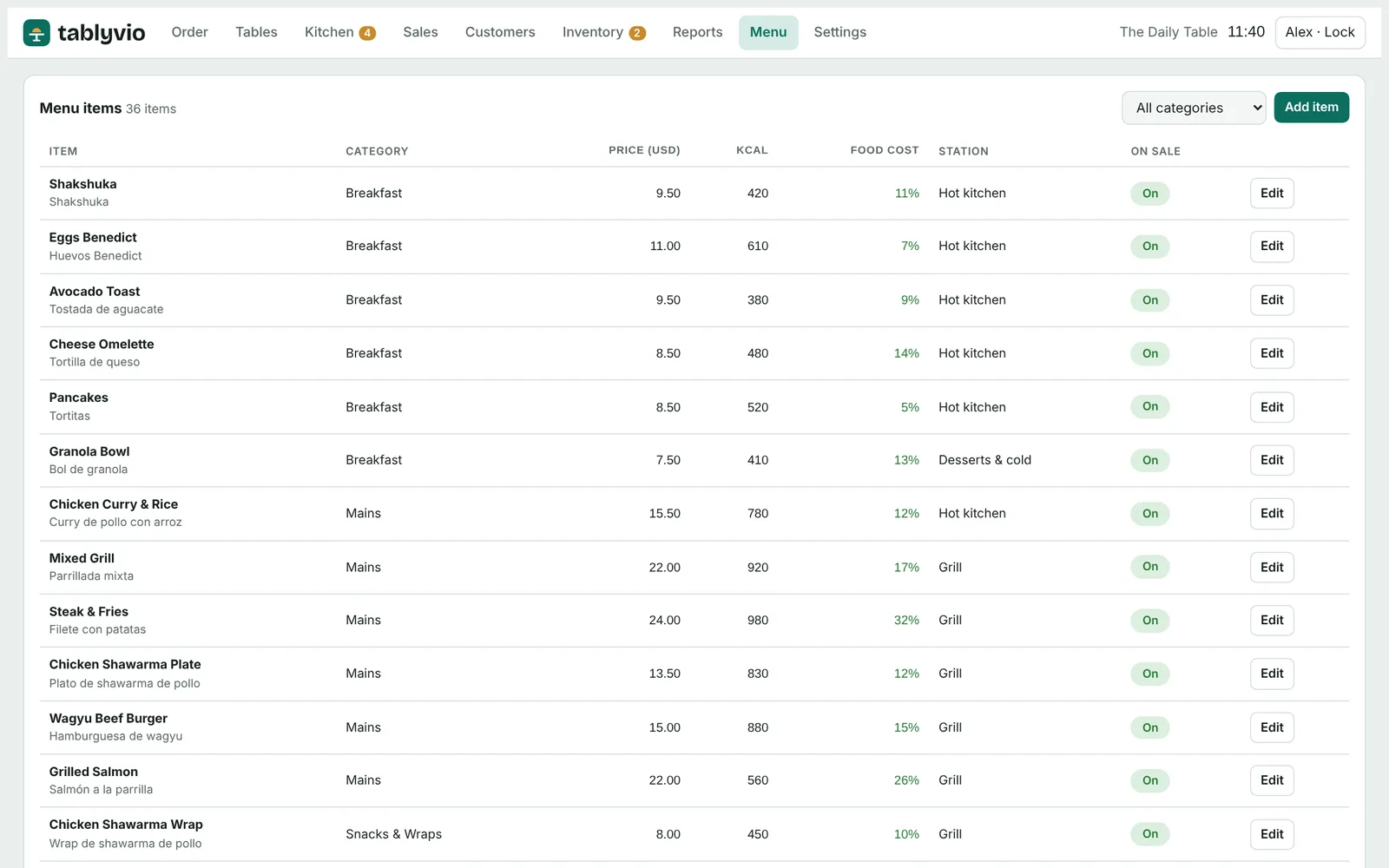
Change the menu in seconds
Add dishes with names in your second language, calories and allergens, set options, and switch an item off the moment it runs out.
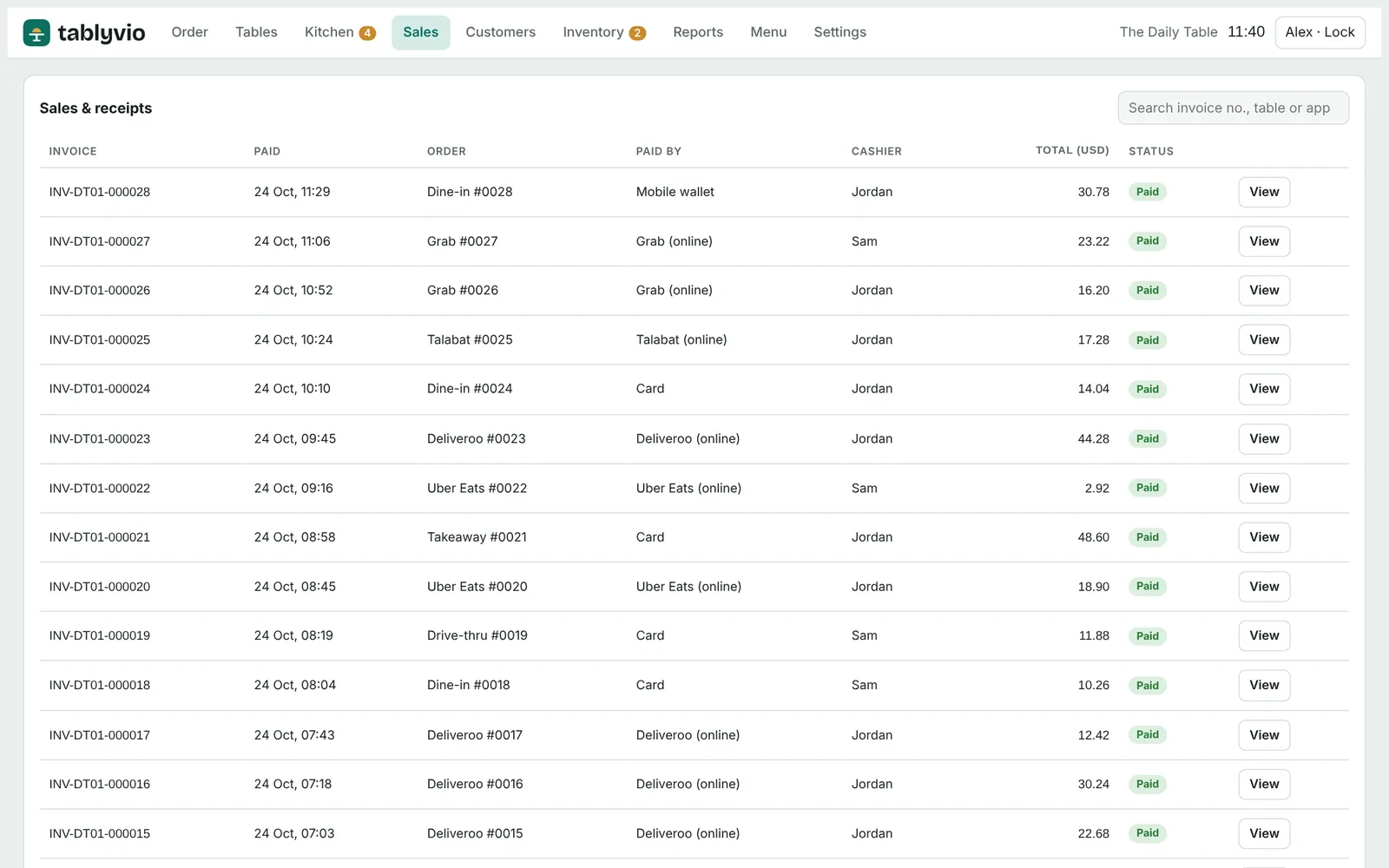
Find any receipt
Search by invoice number or table, reprint a tax invoice, or refund it with a credit note that a manager approves.
Real people who answer, in English and Arabic.
Restaurants don't keep office hours, so neither do we. Every plan includes setup help and support on WhatsApp, phone and email.
- Kick-off call
We learn how your restaurant runs and which plan fits.
- Menu setup
Send us your menu as a PDF or photo and we load it, with names in your second language and prices.
- Staff training
A short session for cashiers, waiters and kitchen, online or at your outlet.
- Go live
We stay on call for your first service and check in after the first week.
Simple monthly plans. Cancel any time.
Starter
+ $50 one-time setup · 2 devices included · extra devices $5/month each
2 outlets: $34/month · 3 or more: custom pricing
For a single café, kiosk or juice bar.
- 2 devices per outlet included
- Ordering, tables and kitchen display
- Tax receipts in 68 languages
- Works offline
Professional
+ $150 one-time setup · 4 devices included · extra devices $5/month each
2 outlets: $70/month · 3 or more: custom pricing
For full-service restaurants that want control.
- 4 devices per outlet included
- Inventory, recipes and food cost
- Loyalty and customer profiles
- Priority support and onboarding
Enterprise
For groups, franchises and hotel outlets.
- Several outlets and brands
- Central menu and reports
- Dedicated account manager
- On-site training
Prices in US dollars, plus a one-time setup fee. Local taxes may apply. Save two months when you pay yearly.
Common questions
Do I need special hardware?
No. Tablyvio runs on the tablets, laptops and touch screens you may already have. For printed receipts, any 80 mm thermal receipt printer that works with your computer will do. Our team can recommend hardware that is easy to buy where you are.
What happens if the internet goes down?
If you install Tablyvio on your computer, it keeps working without internet: you can take orders, send them to the kitchen, take payment and print receipts. Sales are saved on the device.
Are the receipts valid for tax?
In countries marked Fully supported or General profile, each receipt shows your business name, tax number, a sequential invoice number, the date, the tax and the total, in English and your local language. Refunds create a credit note. Where the law requires a certified till, Tablyvio runs in training mode and says so on the receipt. Your accountant should confirm your local rules.
Can I accept card payments?
Yes. You keep using your bank's card machine and record the payment in Tablyvio as card, wallet or other payment types. Direct links to card machines from local payment providers are coming soon.
How long does setup take?
Most restaurants are ready the same day. Send us your menu and we load it for you, then a short training session gets your team going.
Which languages can receipts print in?
English only, or English plus one of 68 languages, including Arabic, Chinese, Hindi, Spanish, French, Bengali, Portuguese, Russian, Urdu, Indonesian, German, Japanese, Turkish, Persian, Filipino, Malayalam, Tamil, Italian or Korean. You choose in Settings and can change it at any time.
Try Tablyvio free for 7 days
No card needed. We set up your menu with you and train your team, in English or Arabic.